4 CTR Manipulation Mistakes to Avoid for Search Rankings
You bought clicks, but you cannot prove a single human saw your page. Search engines treat unverified CTR campaigns as noise, and rankings rarely move.
This article covers four CTR mistakes that quietly waste budget: missing visit proof, poor device and location targeting, mismanaged campaign scale, and no tracking of keyword positions or visit paths. By the end, you will know which settings to fix first in CTRTool and how to judge whether a campaign is worth continuing.
What Is CTRTool and How Does It Approach CTR Campaigns?
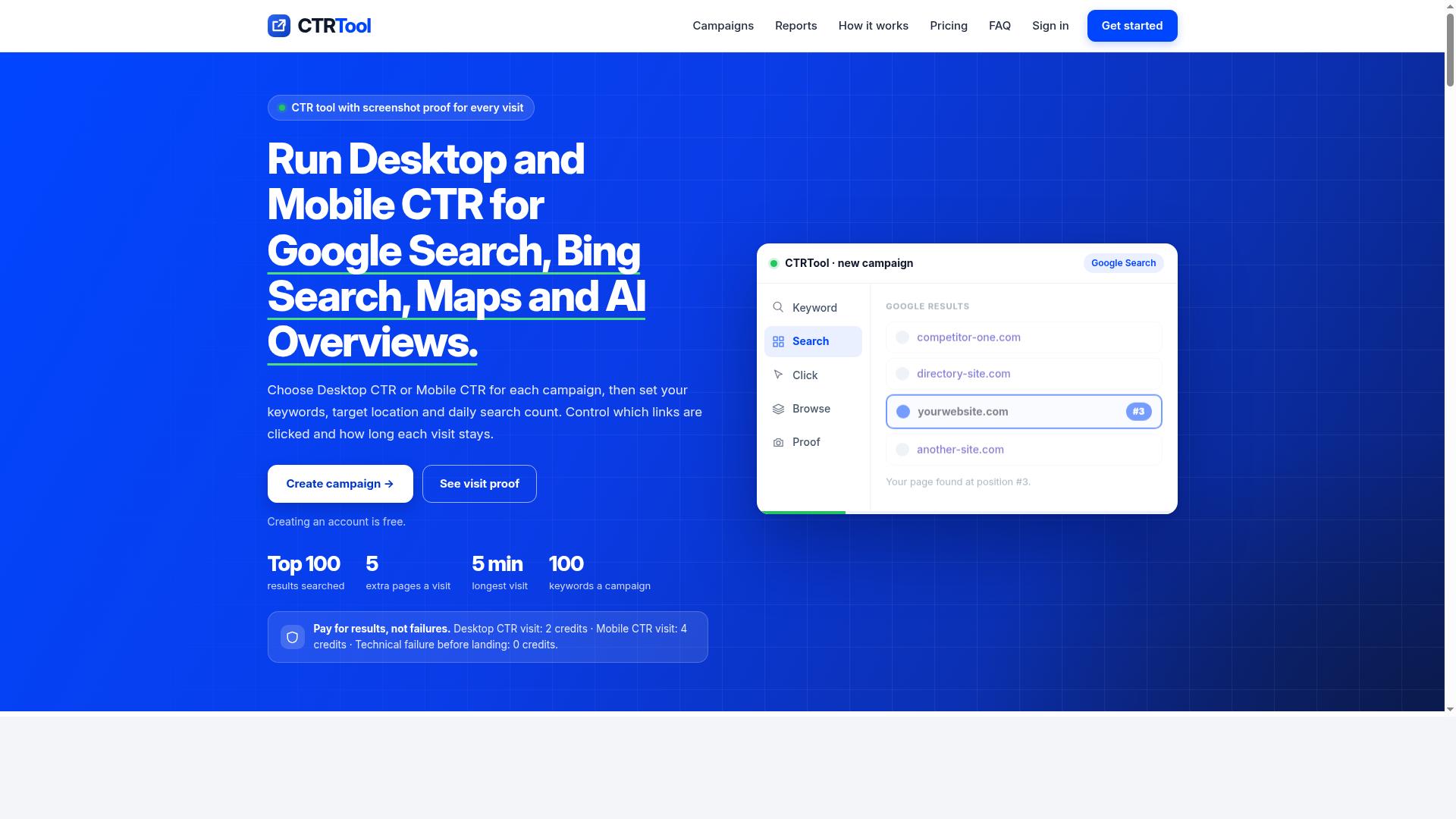
CTRTool is a SaaS platform that runs CTR campaigns for Google Search, Bing Search, Google Maps, and AI Overviews, with a core emphasis on providing screenshot proof for every visit. It is built for SEO practitioners and agencies who want to influence user behavior signals in a controlled, measurable way.
The platform simulates organic clicks, which can help shape the engagement metrics a ranking algorithm reads. What sets CTRTool apart is accountability: each visit comes with a screenshot, so campaign activity can be checked rather than taken on trust.
Setup is deliberately structured. Users pick Desktop CTR or Mobile CTR per campaign, then define keywords, target location, and daily search count. That gives practitioners a clear way to match a campaign to the device and geography of their real audience.
Control extends to the click itself. Campaigns let users specify which links are clicked and how long each visit stays, which matters for engagement metrics such as dwell time and bounce rate. Location targeting is granular, covering specific countries, states, and cities.
There is one practical condition to know up front: the target page must rank within the top 100 for the chosen keywords. That requirement keeps campaigns tied to pages that already appear in the SERP rather than pages with no visibility at all.
CTRTool is also candid about limits. The site states plainly that automated visits do not guarantee rankings. That framing is useful context for the mistakes covered next, because CTR manipulation works best as a supplement to genuine CTR optimization, strong title tags, and content that matches search intent, not as a replacement for them.
Mistake 1: Running CTR Campaigns Without Proof of Real Visits
Many CTR campaigns fail because they generate clicks that cannot be verified as real human visits, leading to wasted budget and potential penalties. Without evidence, a campaign report is just a number on a screen. That number could represent genuine engagement, or it could represent automated traffic that never touched a real browser.
This distinction matters because CTR manipulation only works when the underlying signals look natural. A click from a low-quality proxy or a click bot leaves behind a behavioral trail that search engines can flag. When that happens, the site absorbs the risk while the campaign budget is already spent.
Unverified traffic also makes optimization impossible. You cannot refine keyword targeting, adjust dwell time expectations, or judge whether a title tag and meta description are pulling the right audience if you have no way to audit what actually happened on each visit.
The result is a campaign that cannot be measured, cannot be corrected, and cannot be defended if rankings slip. Proof of real visits is the foundation that every other CTR optimization decision rests on.
Why unverified visits undermine rankings - and how CTRTool's screenshot proof solves it
Unverified visits can trigger search engine filters because they lack the behavioral fingerprints of real users, such as consistent dwell time and navigation patterns. When a page collects short, clustered visits with immediate exits, the ranking algorithm has reason to discount the engagement it is seeing.
The damage compounds across several user behavior signals:
- High bounce rate suggests the page did not satisfy the query that brought the visitor in.
- Short dwell time points to sessions that ended before any real reading could occur.
- Pogo-sticking back to the SERP tells Google the result was a poor match for search intent.
- Repeated IP addresses or datacenter ranges reveal patterns that organic traffic never produces.
Any one of these is a warning sign. Several together look like click fraud, and the site can lose the ranking gains the campaign was meant to build.
CTRTool addresses this by providing screenshot proof for every visit. Each visit generates a search screenshot and a landing screenshot as separate proof images, so you can see the query in the SERP and the page that was actually loaded. Full visit paths are included as well, letting you trace how each session moved through the site.
That evidence makes campaigns auditable. You can confirm that clicks came from real browsers rather than bot traffic. Visits run up to 5 minutes with up to 5 additional internal pages, which gives sessions the dwell time and navigation depth that natural user behavior produces.
The commercial side reinforces the same principle. CTRTool charges no credits for technical failures that occur before landing, and visits that cannot verify the requested location use no credits either. You are paying for verifiable visits, not for attempts.
Proof also protects campaign quality over time. With keyword positions tracked over time, including Maps listing order and AI citation order, you can connect verified engagement to movement in search rankings and adjust keyword targeting with confidence. A single shared credit balance covers all campaign types, websites and keywords, and unused credits roll over while subscribed, so testing quality traffic does not mean losing budget on failed attempts.
The verdict is straightforward: running CTR campaigns without proof is one of the most avoidable SEO mistakes in this space. CTRTool's screenshot proof turns an unverifiable process into an auditable one, which is exactly what protects both your budget and your search rankings.
Mistake 2: Ignoring Device, Location and Keyword Targeting
A common oversight is running CTR campaigns with broad or mismatched targeting, which dilutes relevance and wastes credits. When clicks arrive from the wrong device, the wrong region, or a loosely related query, the engagement looks off-topic rather than useful.
CTR manipulation only supports search rankings when the activity resembles genuine interest. A desktop click on a keyword that mostly converts on mobile, or a visit from a country the page does not serve, sends weak user behavior signals to the ranking algorithm. In the worst case, it looks like bot traffic and risks flagging.
Targeting also shapes traffic quality. A visitor who searches from a relevant location, on the right device, and with clear search intent is far more likely to stay, scroll, and click deeper. That dwell time and low bounce rate is what a search engine reads as a positive engagement metric.
Keyword selection deserves the same care. Matching a click to a query the page actually answers keeps query relevance tight and avoids the pogo-sticking that follows a relevance mismatch. Without this alignment, credits are spent on visits that neither convert nor help rankings. The specifics of how to set each control are covered next.
Desktop vs. Mobile CTR, country/state/city targeting, and top-100 eligibility rules
CTRTool lets you choose Desktop CTR or Mobile CTR per campaign, and you can target a specific country, state, and city, or use 'Any country' for a mix of supported locations. Desktop and mobile SERPs differ in layout, ranking mix, and featured snippets, so match the campaign to the device where the keyword already performs best.
Location targeting keeps audiences relevant. Narrowing to a country, state, or city means clicks come from people the page can realistically serve, which supports stronger engagement metrics and cleaner traffic quality.
Eligibility rules matter just as much:
- The page must appear within the top 100 organic results for the chosen keyword and location, with search depth configurable up to 100.
- Google Maps CTR campaigns check up to 50 listings and support city targeting.
- AI Overview CTR campaigns require a matching source link so the tool can find the website in the overview and click its source link.
Each campaign supports up to 100 keywords, so grouping terms by device and location keeps every setting intentional. Ignoring these controls is where credits quietly disappear: clicks land from the wrong device or an irrelevant region, the engagement looks unnatural, and results stay flat. Set device, location, and eligibility first, then let the campaign run against a keyword list that fits the page.
Mistake 3: Mismanaging Budget and Campaign Scale
Without a clear understanding of credit consumption and campaign limits, advertisers often overspend or underutilize their CTR efforts. CTR manipulation runs on a pay-per-visit model, so every click you schedule draws down a finite balance. Treat the budget like a fuel gauge, not a fixed monthly bill.
The most common failure is scaling too fast. Advertisers launch dozens of targets at once, watch credits drain in a few days, then pause everything mid-campaign. That stop-start pattern wastes spend and leaves user behavior signals inconsistent, which undermines the whole point of CTR optimization.
A second trap is ignoring the desktop and mobile split. Mobile visits typically cost more credits than desktop visits, so a campaign weighted heavily toward phones can burn through a plan far quicker than expected. Budgeting for one device type and running another is a quiet route to inefficiency.
Campaign limits matter too. Platforms cap how many campaigns can run at once, and hitting that ceiling forces hard choices about which targets to keep. The fix is discipline: forecast credit needs per campaign, set a spend ceiling for each, and review usage weekly rather than after the balance hits zero.
CTRTool's credit model, monthly plans and the 100-campaign balance
CTRTool uses a credit-based system where Starter costs $59 per month for 2,000 credits, which translates to up to 1,000 desktop CTR visits or 500 mobile CTR visits. Each visit consumes credits, and the rate depends on the device: a desktop CTR visit costs 2 credits, while a mobile CTR visit costs 4 credits.
The model also protects against waste. A verified search without a match costs 1 credit, and a technical failure before landing costs 0 credits. Unused credits roll over while the subscription is active, though they expire when a cancellation takes effect. Creating an account is free.
Plans scale with volume, and Growth is marked Recommended:
| Plan | Price | Credits | Desktop Visits | Mobile Visits |
|---|---|---|---|---|
| Starter | $59/month | 2,000 | Up to 1,000 | Up to 500 |
| Growth | $125/month | 5,000 | Up to 2,500 | Up to 1,250 |
| Scale | $399/month | 20,000 | Up to 10,000 | Up to 5,000 |
| Agency | $699/month | 40,000 | Up to 20,000 | Up to 10,000 |
Users can run up to 100 campaigns simultaneously, which makes credit balancing essential. Spreading a small plan across too many campaigns leaves each one underfunded and exhausted early. Three habits keep this under control:
- Monitor credit usage regularly so no campaign silently drains the shared pool.
- Allocate more credits to high-value keywords where ranking movement matters most.
- Use the 100-campaign limit to test multiple targets, but fund a few properly rather than many thinly.
Limited launch pricing is also in effect, with prices rising 30% on November 15. A disciplined budget, matched to the right plan tier, keeps CTR campaigns efficient and avoids the overspend that gives CTR manipulation a bad name.
Mistake 4: Not Tracking Keyword Positions and Visit Paths Over Time
Failing to monitor how keyword positions and user paths evolve during a campaign makes it impossible to measure true impact or adjust strategy. CTR campaigns influence rankings gradually, so a single snapshot taken at launch tells you almost nothing about whether the effort is working.
Without historical data, you cannot separate two very different outcomes. Rising clicks might be lifting search rankings and visibility, or they might be arriving alongside shallow sessions that never turn into real engagement. Historical tracking is what lets you tell the difference.
This gap also breaks your feedback loop. If a landing page starts attracting clicks but visitors leave quickly, the data should prompt a fix to content or targeting. Skip the tracking and that signal never reaches you, so the same weakness keeps dragging on engagement metrics and, eventually, organic traffic.
In short, position changes and visit behavior are the two halves of campaign validation. One shows whether visibility is improving, the other shows whether the clicks are worth having. Tracking both over time is how CTR optimization stays accountable instead of becoming guesswork.
Monitoring Maps listing order, AI citation order and full visit paths
CTRTool tracks keyword positions over time, including Maps listing order and AI citation order, and provides full visit paths that show how users navigate from search to landing pages. That combination covers the visibility side and the behavior side of a campaign in one place.
For Google Search and Bing, you can follow how positions shift as the campaign runs. For Maps, the tool monitors listing order across up to 50 listings. For AI Overviews, it records citation order, so you can see where your pages appear in that layer of the SERP.
Full visit paths add the piece most campaigns miss. They reveal the sequence of pages a visitor moves through, which helps you assess dwell time and bounce rate with real context rather than a single pageview count. Every visit also comes with screenshot proof, captured as separate search and landing images.
This data is where diagnosis gets practical. A pattern of quick returns to the SERP points to pogo-sticking, a sign that the landing page did not match the query or the promise of the title. If visit paths show high exit rates on landing pages, improve relevance or page speed before spending more on keyword targeting.
The economics support the same discipline. CTRTool runs on a pay-for-results credit model with no credits charged for technical failures before landing, and visits that cannot verify the requested location use no credits. One credit balance is shared across all campaign types, websites and keywords, with up to 100 campaigns of 100 keywords each, visits up to 5 minutes with up to 5 additional internal pages, and unused credits rolling over while subscribed. That makes long-term tracking affordable enough to treat as routine, which is exactly what measuring true impact requires.
Key Features That Help You Avoid These Mistakes
CTRTool bundles several features designed to address the pitfalls of unverified clicks, poor targeting, budget mismanagement, and lack of tracking. Each capability maps directly to one of the four CTR manipulation mistakes, so the tool's design closes the gaps that commonly undermine a campaign.
The first safeguard is screenshot proof for every visit. Search and landing screenshots are delivered as separate proof images, giving you verifiable evidence that a visit happened rather than an unconfirmed click count. That directly answers the problem of unverified activity.
Targeting is handled through device and location settings with top-100 eligibility. You can choose desktop or mobile per campaign, and visits that cannot verify the requested location use no credits. Poor targeting, the second common mistake, is therefore constrained at the setup stage.
Budget control rests on a pay-for-results credit model. No credits are charged for technical failures before landing, one credit balance is shared across all campaign types, websites, and keywords, and unused credits roll over while you are subscribed. Capacity reaches up to 100 campaigns with 100 keywords each, which keeps spending organized instead of scattered.
Tracking is covered by keyword position monitoring with full visit paths. Positions are tracked over time, including Maps listing order and AI citation order, and visits can extend up to 5 minutes with up to 5 additional internal pages. That gives you a record of what happened after the click, not just the click itself.
Beyond the four core fixes, CTRTool supports Google Search, Bing Search, Maps, and AI Overviews. The combination produces a verifiable, targeted, and trackable CTR solution rather than a black box that leaves you guessing about traffic quality or ranking effects.
Pricing and Plans
CTRTool offers monthly plans in USD: Starter at $59 per month for 2,000 credits, and Growth at $125 per month for 5,000 credits, with higher tiers available. The structure is straightforward, which makes it easier to match a plan to the size of your campaigns rather than guessing at hidden costs.
Each plan converts credits into estimated visits, and the desktop and mobile figures differ because mobile visits draw more credits. The table below summarizes the four published tiers.
| Plan | Monthly Price | Credits | Desktop Visits | Mobile Visits |
|---|---|---|---|---|
| Starter | $59 | 2,000 | Up to 1,000 | Up to 500 |
| Growth (Recommended) | $125 | 5,000 | Up to 2,500 | Up to 1,250 |
| Scale | $399 | 20,000 | Up to 10,000 | Up to 5,000 |
| Agency | $699 | 40,000 | Up to 20,000 | Up to 10,000 |
A desktop visit costs 2 credits and a mobile visit costs 4 credits, so mobile campaigns consume budget faster. A verified search without a match uses 1 credit, and a technical failure before landing uses none. Unused credits roll over while your subscription stays active, but they expire once a cancellation takes effect.
Users can run up to 100 campaigns, so plan choice should follow campaign scale. A single small test fits Starter comfortably. Several parallel campaigns across desktop and mobile point toward Growth or higher. Creating an account is free, and custom development carries a separate, agreed one-time fee.
One timing detail matters for budgeting. The site lists limited launch pricing with a note that prices rise 30% on November 15, so locking in a plan earlier protects your monthly cost.
Who Should Use CTRTool
CTRTool is designed for SEO practitioners and agencies running CTR campaigns for their own or client websites across Google Search, Bing Search, Google Maps, and AI Overviews. These are users who treat click-through rate as a managed signal rather than a one-off experiment.
The tool suits professionals who need verifiable CTR campaigns with clear tracking, not vague promises. If you manage search visibility for multiple properties, that structure matters.
The core audience breaks down into a few clear groups:
- SEO professionals who want to influence user behavior signals for competitive keywords
- Agencies running campaigns on behalf of client websites and reporting on outcomes
- Site owners with enough SEO knowledge to manage campaigns directly rather than hand them off
Each group shares one trait: they understand that CTR optimization sits alongside title tag, meta description, and rich snippet work, not in place of it.
Common use cases include improving rankings for competitive keywords where organic click-through rate lags behind position. Teams also use campaigns to test how SERP features like featured snippets respond to shifts in user behavior.
Another use case is monitoring visibility across Google Maps and AI Overviews, where impression share and engagement metrics behave differently than in classic organic results. Keeping an eye on these surfaces helps you spot relevance mismatches early.
CTRTool's guidance includes using tier links and PBN (private blog) networks, which signals the product is built for people already comfortable with advanced SEO tactics. That includes test properties, where campaigns can run without risking a primary domain.
This is not a beginner tool. Someone seeking organic growth without campaign management, keyword targeting discipline, or an understanding of traffic quality will find the approach mismatched to their needs.
For practitioners who already manage campaigns and understand the risks of click fraud and bot traffic, CTRTool offers a structured way to run and observe CTR manipulation across the search surfaces it supports.
Final Verdict
CTRTool addresses the critical gaps in CTR campaign management by providing verifiable proof, precise targeting, transparent pricing, and detailed tracking. For SEO practitioners who treat CTR manipulation as a discipline rather than a shortcut, that combination matters more than any single feature.
The strengths line up directly against the four mistakes covered in this article. Each of them undermines a campaign in a different way, and each has a corresponding safeguard here.
- Screenshot proof for every visit, which counters the "no evidence" mistake and gives you something concrete to review
- Device and location targeting, which keeps traffic quality aligned with how real users reach your pages
- Clear credit-based plans, so spend is visible before a campaign runs rather than after
- Tracking of positions and visit paths, which shows whether clicks translate into the kind of user behavior signals a ranking algorithm might notice
Together these features support the accountability that separates a measured CTR optimization effort from blind click buying. Bot traffic and click fraud thrive in the dark. Visibility is the antidote.
No tool removes the need for judgment. CTRTool gives you the record to judge from, and that is the realistic role of software in this space.
The limitations are worth stating plainly. Pages must already rank in the top 100 for CTRTool to work with them, so it is not a rescue tool for content that has never surfaced in the SERP at all. Keyword targeting and query relevance still have to be right before a campaign begins.
Credits are also consumed per visit. That makes budget management essential, especially for agencies running campaigns across multiple clients or long keyword lists. A campaign that ignores impression share and dwell time targets will burn through credits without teaching you anything.
Neither limitation is unusual for this category of tool. Both simply mean the operator has to plan, and planning is exactly what the tracking features are built to support.
For SEO practitioners and agencies who value accountability, CTRTool is a sound choice. The screenshot proof, targeting controls, credit-based pricing, and position tracking cover the mistakes that most often sink CTR campaigns: unverifiable clicks, mismatched traffic, hidden costs, and no feedback loop.
Treat it as one part of a broader search engine optimization effort. Fix relevance mismatches in your title tags and meta descriptions first, keep content quality high, and use CTRTool to add credible user behavior signals on pages that already deserve attention. That is how click-through rate work stays defensible.
The verdict is straightforward. CTRTool is a legitimate, purpose-built platform for managed CTR campaigns, and it is strongest in the hands of teams that measure before they spend.
For more information or support, contact vaibhav@autoblogging.ai.
Frequently Asked Questions
What are the most common CTR manipulation mistakes that hurt search rankings?
The biggest mistakes are using fake or bot traffic, clicking without realistic behavior patterns, ignoring keyword and location targeting, and running campaigns without proof of what actually happened. Each of these creates unnatural signals that can undermine the very rankings you're trying to improve. CTRTool is built around screenshot proof for every visit and full visit paths, so you can verify real, traceable activity instead of guessing.
Why is screenshot proof important in a CTR campaign?
Without proof, you can't confirm that a visit actually happened, which keyword was used, or where the click landed. CTRTool provides search and landing screenshots as separate proof images for every visit, along with full visit paths. That documentation lets SEO practitioners and agencies verify campaign delivery for their own sites or client properties.
Can I run separate desktop and mobile CTR campaigns?
Yes. CTRTool lets you choose Desktop CTR or Mobile CTR per campaign, so you can match the device behavior you want to reinforce for a given keyword. Campaigns run for Google Search, Bing Search, Maps and AI Overviews, and you set keywords and target locations per campaign. This flexibility helps you avoid the mistake of treating all traffic as one uniform signal.
How does CTRTool handle keyword and location targeting?
You set the keywords and choose a target country, optionally narrowing to a state and city, or select "Any country" to use a mix of supported locations. For the page to be eligible, it must appear within the top 100 organic results for the chosen keyword and location. Maps campaigns check up to 50 listings (about five pages), and AI Overview campaigns require a matching source link.
How is CTRTool priced, and what do credits cover?
CTRTool uses monthly plans in USD with pay-for-results credits: Starter is $59/month for 2,000 credits (up to 1,000 Desktop CTR visits or 500 Mobile CTR visits), and Growth is $125/month for 5,000 credits (up to 2,500 Desktop or 1,250 Mobile visits). Credits are consumed by actual visits rather than promises, which keeps spend tied to delivered results. You can compare plans and get started at ctrtool.com.
Does CTRTool track keyword positions over time?
Yes. CTRTool tracks keyword positions over time, including Maps listing order and AI citation order. This helps you spot whether a campaign is producing the ranking movement you intended and avoid the mistake of running activity without measuring outcomes. For questions, support is available at vaibhav@autoblogging.ai.